
Table of Contents
- What Is a VPN, Really?
- The Core Mechanics: Tunneling
- Encryption: How Your Data Stays Private
- VPN Protocols Explained
- IP Masking and Geo-Spoofing
- DNS Leak Protection
- Authentication and Key Exchange
- The VPN Handshake: Step-by-Step
- Split Tunneling
- Kill Switches and Leak Protection
- VPN vs. Proxy: Key Differences
- Free VPNs vs. Paid VPNs
- Is a VPN Legal?
- Limitations of VPNs
- Choosing the Right VPN
- Frequently Asked Questions
1. What Is a VPN, Really? {#what-is-a-vpn}
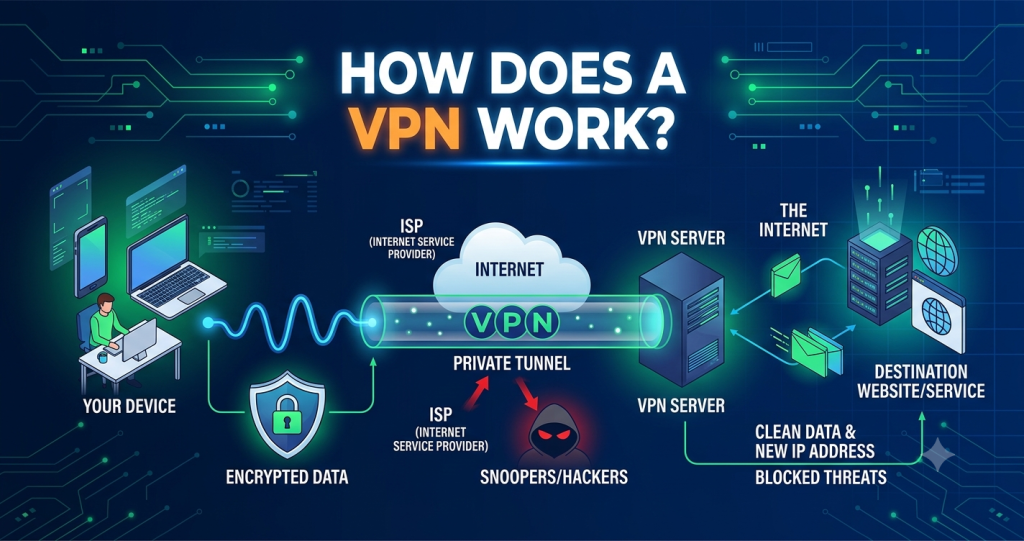
A Virtual Private Network (VPN) is a technology that creates a secure, encrypted connection between your device and a remote server operated by the VPN provider. All your internet traffic is routed through this encrypted tunnel before reaching the open internet, effectively hiding your identity, location, and data from your Internet Service Provider (ISP), network administrators, and third-party snoopers.
The word “virtual” refers to the fact that the private network doesn’t rely on dedicated physical cables — it operates logically over the existing public internet infrastructure. The word “private” refers to the cryptographic isolation of your data from anyone outside the tunnel.
To understand the full scope of what a VPN is — beyond just how it works — see our foundational guide: What Is a VPN?
At its most fundamental level, a VPN does three things:
- Encrypts your data before it leaves your device
- Tunnels that data through a secure pathway to a VPN server
- Masks your real IP address with that of the VPN server
Everything else — geo-unblocking, streaming, privacy, business use cases — flows from these three core functions.
2. The Core Mechanics: Tunneling {#the-core-mechanics-tunneling}
The concept of tunneling is the bedrock of VPN technology. It refers to the process of encapsulating one network protocol inside another.
Think of it like placing a sealed letter (your data) inside a padded envelope (the VPN tunnel). The postal service (the internet) only sees the outer envelope and its destination — the VPN server. They have no knowledge of what’s inside.
How Tunneling Works
When you connect to a VPN:
- Your VPN client encapsulates your outgoing data packets by wrapping them in an additional layer of packet headers.
- These encapsulated packets are encrypted so that even if intercepted, the contents are unintelligible.
- The encrypted, encapsulated packets travel across the internet to the VPN server.
- The VPN server decapsulates and decrypts the packets, then forwards your original request to the intended destination (e.g., a website).
- The website’s response is sent back to the VPN server, which then re-encrypts the data and sends it back through the tunnel to your device.
- Your VPN client decrypts the response, and you see the webpage normally.
This entire process happens in milliseconds and is entirely transparent to the end user.
Packet Encapsulation in Depth
At the network level, your data travels in packets — small chunks of data that include a header (with routing information such as source and destination IP addresses) and a payload (the actual content).
During VPN tunneling:
- The original packet (including its original IP header) becomes the payload of a new packet.
- The new packet’s header contains routing information pointing to the VPN server, not your final destination.
- This means routers along the path only know they’re sending traffic to the VPN server; the real destination is hidden inside.
This is why VPNs are so effective at masking your traffic — the public internet only ever sees the VPN server as both the source and destination of your data.
3. Encryption: How Your Data Stays Private {#encryption}
Tunneling moves your data securely, but encryption is what makes it unreadable to anyone who might intercept it. Without encryption, a VPN would simply be an anonymising relay — not a private one.
Symmetric Encryption
Modern VPNs use symmetric encryption for the bulk of data transfer, most commonly AES (Advanced Encryption Standard). AES is the same standard used by the U.S. National Security Agency (NSA) to protect classified information (NIST FIPS 197).
| Key Length | Security Level | Common Use |
|---|---|---|
| AES-128 | Extremely strong | Faster devices, general use |
| AES-256 | Military-grade | Recommended for privacy-critical use |
With AES-256, there are 2²⁵⁶ possible keys. Even with all the computing power on Earth working for billions of years, brute-forcing AES-256 encryption is computationally infeasible by current standards.
How Symmetric Encryption Works
- Both your device and the VPN server share a secret key.
- Your data is encrypted using that key before transmission.
- The recipient uses the same key to decrypt it.
The challenge is: how do two parties share a secret key securely over an insecure channel? This is solved by asymmetric encryption during the handshake phase (covered in Section 7).
Cipher Modes
AES is typically used in GCM (Galois/Counter Mode), which provides both encryption and data integrity verification (authentication) simultaneously. This ensures not only that data is private, but that it hasn’t been tampered with in transit — a property called authenticated encryption.
Perfect Forward Secrecy (PFS)
A critical feature of well-implemented VPNs is Perfect Forward Secrecy. This means the session key used to encrypt your traffic is unique to each session and discarded afterward. Even if an attacker somehow obtained your long-term private key, they could not decrypt past sessions.
PFS is implemented through Diffie-Hellman (DH) or Elliptic Curve Diffie-Hellman (ECDH) key exchange protocols, which generate ephemeral (one-time) session keys.
4. VPN Protocols Explained {#vpn-protocols}
A VPN protocol defines the rules for how tunneling and encryption are carried out. It determines how the VPN client and server authenticate each other, how encryption keys are negotiated, and how data is packaged for transmission.
Different protocols offer different trade-offs between speed, security, and compatibility.
OpenVPN
OpenVPN is the most widely trusted open-source VPN protocol, audited by independent security researchers worldwide. It uses TLS (Transport Layer Security) for key exchange and can run on either UDP (faster) or TCP (more reliable, for restrictive networks).
- Security: Extremely high (uses AES-256-GCM, RSA-4096, SHA-256)
- Speed: Moderate — strong encryption has computational overhead
- Compatibility: Requires a third-party client; not natively supported on most OS
- Auditability: Open-source — fully auditable (OpenVPN GitHub)
WireGuard
WireGuard is a modern, lean VPN protocol with just ~4,000 lines of code (compared to OpenVPN’s ~400,000+). Its small codebase dramatically reduces the attack surface and makes auditing far easier. It uses state-of-the-art cryptography: ChaCha20 for encryption, Curve25519 for key exchange, and BLAKE2s for hashing.
- Security: Extremely high (modern cryptographic primitives)
- Speed: Fastest available — ideal for mobile and streaming
- Compatibility: Increasingly native on Linux, Windows, macOS, iOS, Android
- Limitation: No built-in obfuscation; more easily detected by DPI (Deep Packet Inspection)
WireGuard is now the default or recommended protocol for most major VPN providers including Mullvad and NordVPN (WireGuard official).
IKEv2/IPSec
Internet Key Exchange version 2 paired with IPSec is a highly stable protocol developed by Microsoft and Cisco. It excels at handling network switching (e.g., from Wi-Fi to mobile data) through its MOBIKE extension, making it ideal for mobile devices.
- Security: High (typically paired with AES-256)
- Speed: Fast, especially on mobile
- Compatibility: Natively supported on iOS, macOS, Windows
- Downside: Closed-source implementations on some platforms; IPSec port (UDP 500) can be blocked
L2TP/IPSec
Layer 2 Tunneling Protocol combined with IPSec was once widely used but is now largely deprecated. Edward Snowden’s 2013 NSA disclosures suggested L2TP may have been deliberately weakened by the NSA (The Guardian, 2013). Most security experts no longer recommend it.
SSTP
Secure Socket Tunneling Protocol was developed by Microsoft and operates over HTTPS port 443, making it effective at bypassing firewalls. However, it is closed-source and proprietary, limiting security auditing.
Obfuscation Protocols
In countries with heavy internet censorship (China, Russia, Iran), standard VPN protocols are detectable via Deep Packet Inspection (DPI). Providers such as ExpressVPN (Lightway), NordVPN (obfuscated servers), and Shadowsocks-based providers offer obfuscated protocols that disguise VPN traffic as normal HTTPS traffic.
Protocol Comparison Summary
| Protocol | Speed | Security | Auditable | Best For |
|---|---|---|---|---|
| WireGuard | ★★★★★ | ★★★★★ | ✅ | Speed, mobile |
| OpenVPN (UDP) | ★★★★ | ★★★★★ | ✅ | General privacy |
| OpenVPN (TCP) | ★★★ | ★★★★★ | ✅ | Bypassing firewalls |
| IKEv2/IPSec | ★★★★★ | ★★★★ | Partial | Mobile, switching networks |
| L2TP/IPSec | ★★★ | ★★ | Partial | Legacy (avoid) |
| SSTP | ★★★ | ★★★ | ❌ | Windows, bypassing firewalls |
5. IP Masking and Geo-Spoofing {#ip-masking}
Your IP address is your device’s identifier on the internet — it reveals your approximate geographic location and is used by websites, advertisers, and governments to track your online activity.
When you connect to a VPN:
- Your device’s real IP address is hidden from all websites and services you visit.
- Your traffic appears to originate from the VPN server’s IP address.
- Websites log the VPN server’s IP, not yours.
How IP Masking Works at the Network Level
Normally, when you request a webpage, your ISP routes your packets to the destination server, which sees your real public IP in the packet headers.
With a VPN:
- Your packets travel encrypted to the VPN server.
- The VPN server strips your original IP from the decapsulated packet.
- It substitutes its own IP as the source address when forwarding your request.
- The destination server responds to the VPN server’s IP.
- The VPN server relays the response back to you through the tunnel.
Shared IP Addresses
Most commercial VPN providers assign shared IP addresses — many users simultaneously share the same IP address. This creates a layer of ambiguity: even if a website logs the IP, it cannot attribute activity to any specific user among hundreds sharing it.
This is a deliberate privacy design, not a limitation.
Geo-Spoofing and Geo-Unblocking
By connecting to a VPN server in a different country, you can access geo-restricted content — streaming libraries, news sites, banking portals — that would otherwise be unavailable in your region.
For example, connecting to a US-based VPN server makes Netflix believe you’re in the United States, granting access to the US content library.
6. DNS Leak Protection {#dns-leak-protection}
Even with a VPN active, a subtle but critical vulnerability can undermine your privacy: DNS leaks.
What Is DNS?
The Domain Name System (DNS) is the internet’s phone book. When you type example.com, your device queries a DNS server to translate that domain into an IP address (e.g., 93.184.216.34). Normally, these queries are handled by your ISP’s DNS servers.
DNS queries happen outside your browser’s encrypted traffic, which means they can leak your browsing activity even when your data itself is encrypted.
What Is a DNS Leak?
A DNS leak occurs when your device sends DNS queries outside the VPN tunnel — directly to your ISP’s DNS servers — despite being connected to a VPN. This means your ISP can still see which websites you’re visiting, even though your traffic appears encrypted.
This can happen due to:
- Operating system DNS resolver settings overriding the VPN
- IPv6 DNS queries bypassing the VPN tunnel
- WebRTC leaks in browsers revealing your real IP
How VPNs Prevent DNS Leaks
Quality VPN providers address this by:
- Running their own DNS servers — all DNS queries are routed through the VPN tunnel to the provider’s private DNS resolvers.
- DNS over HTTPS (DoH) / DNS over TLS (DoT) — encrypting DNS queries themselves to prevent interception.
- IPv6 leak prevention — disabling IPv6 or routing it through the tunnel.
- WebRTC leak blocking — configuring the VPN client to disable or mask WebRTC.
You can verify whether your VPN has DNS leaks using tools such as dnsleaktest.com or ipleak.net.
7. Authentication and Key Exchange {#authentication-and-key-exchange}
Before any encrypted data is transmitted, the VPN client and server must authenticate each other and agree on an encryption key. This is handled during the TLS/SSL handshake (for OpenVPN) or the Noise protocol handshake (for WireGuard).
Asymmetric Cryptography
Asymmetric encryption (also called public-key cryptography) underpins the authentication phase. It uses a mathematically linked key pair:
- Public key — shared openly; used to encrypt data
- Private key — kept secret; used to decrypt data
Anything encrypted with a public key can only be decrypted with the corresponding private key, and vice versa.
VPN servers hold a certificate containing their public key, signed by a trusted Certificate Authority (CA). Your VPN client verifies this certificate to confirm it’s talking to a legitimate server, not an impostor — preventing man-in-the-middle (MITM) attacks.
Diffie-Hellman Key Exchange
To agree on a shared symmetric key over an insecure channel, VPNs use Diffie-Hellman (DH) key exchange:
- Both parties generate their own public/private key pairs.
- They exchange public keys.
- Each party independently computes the same shared secret using mathematical operations on the other’s public key and their own private key.
- This shared secret becomes the basis for the session key used for symmetric encryption.
The brilliance of DH is that neither party ever transmits the secret itself — it is computed independently on both ends. An eavesdropper who captures both public keys cannot derive the shared secret without solving the computationally infeasible discrete logarithm problem.
HMAC Authentication
Beyond encrypting data, VPNs also authenticate it using HMAC (Hash-based Message Authentication Codes). Each packet is accompanied by a cryptographic signature verifying:
- The data came from a legitimate, authenticated party
- The data has not been modified in transit
This protects against replay attacks (retransmitting captured packets) and packet injection.
8. The VPN Handshake: Step-by-Step {#the-vpn-handshake}
The handshake is the brief setup phase before your private tunnel is established. Here’s a precise walkthrough of what happens when you click “Connect”:
Step 1 — Client Hello Your VPN client sends a “hello” message to the VPN server, including the encryption protocols and cipher suites it supports.
Step 2 — Server Authentication The server responds with its digital certificate (public key + identity, signed by a CA). Your client verifies this certificate against trusted CA roots to confirm authenticity.
Step 3 — Key Exchange Using ECDH or DH, both parties independently derive a shared pre-master secret from their respective key pairs.
Step 4 — Session Key Derivation The pre-master secret is fed into a key derivation function (KDF) along with random nonces exchanged during the hello phase, producing the final session keys for encryption and HMAC authentication.
Step 5 — Tunnel Established Both parties confirm they derived the same session keys. Encrypted data transmission begins.
Step 6 — Session Key Rotation With Perfect Forward Secrecy enabled, session keys are periodically regenerated (e.g., every hour), ensuring past sessions remain secure even if future keys are compromised.
This entire handshake typically completes in under 200 milliseconds.
9. Split Tunneling {#split-tunneling}
Split tunneling is an advanced VPN feature that lets you route only specific traffic through the VPN tunnel, while other traffic uses your normal ISP connection directly.
Why Split Tunneling Matters
Without split tunneling, all your traffic — including local network printers, banking apps with IP-based security, and high-bandwidth services like video calls — routes through the VPN. This can:
- Slow down connections (especially on distant VPN servers)
- Break local network device discovery
- Trigger fraud alerts on banking portals that detect unfamiliar IP locations
How Split Tunneling Works
Your VPN client maintains two routing tables simultaneously:
| Traffic Type | Route |
|---|---|
| Specified apps/domains | Encrypted VPN tunnel |
| Everything else | Direct ISP connection |
This is implemented at the network driver level — the VPN client intercepts packets and applies policy-based routing based on source application or destination IP/domain.
Types of Split Tunneling
- App-based split tunneling — Route specific apps through the VPN (e.g., only your browser)
- Inverse split tunneling — Route all traffic through the VPN except specified apps
- URL-based split tunneling — Route specific domains/IPs through the VPN
10. Kill Switches and Leak Protection {#kill-switches}
A kill switch is a safety mechanism that automatically cuts off your internet connection if the VPN connection drops unexpectedly. Without a kill switch, a brief VPN dropout would expose your real IP address and unencrypted traffic — potentially for several seconds before you notice.
System-Level Kill Switch
Operates at the OS firewall level (e.g., iptables on Linux, Windows Filtering Platform on Windows). If the VPN interface goes down, all internet traffic is blocked immediately, regardless of what application initiated it.
Application-Level Kill Switch
Monitors specific apps and terminates them if the VPN disconnects. Less aggressive than a system-level kill switch but useful for protecting specific workflows (e.g., shutting down a BitTorrent client if the VPN drops).
IPv6 Leak Protection
Many VPN providers block IPv6 traffic entirely or tunnel it through the VPN. Since IPv6 is a parallel internet addressing system, it can leak your real address if not explicitly handled.
WebRTC Leak Protection
WebRTC (used by browsers for video calling and P2P) can reveal your real IP even when a VPN is active, because it communicates at a lower network level. VPN clients either disable WebRTC or mask the IP it exposes.
11. VPN vs. Proxy: Key Differences {#vpn-vs-proxy}
Both VPNs and proxies can mask your IP address, but they operate very differently and serve different purposes. Understanding this distinction is essential for choosing the right tool.
For a deeper comparison, read our dedicated guide: VPN vs. Proxy — What’s the Difference?
| Feature | VPN | Proxy |
|---|---|---|
| Encryption | Full end-to-end encryption | None (typically) |
| Traffic coverage | All traffic (device-wide) | Single app/browser only |
| Protocol | OpenVPN, WireGuard, IKEv2 | HTTP, SOCKS5 |
| Speed | Moderate (encryption overhead) | Usually faster (no encryption) |
| IP masking | Yes | Yes |
| DNS privacy | Yes (with DNS protection) | No |
| Bypass firewalls | Yes | Partial |
| Authentication | Mutual (client + server) | Server only |
| Best use case | Privacy, security, geo-unblocking | Simple geo-unblocking, speed |
The key distinction: a proxy routes only specific application traffic and provides no encryption. A VPN creates an encrypted tunnel for all device traffic, including background system processes.
A proxy is to a VPN what a curtain is to a vault.
12. Free VPNs vs. Paid VPNs {#free-vs-paid}
The choice between a free and paid VPN has serious implications for your privacy and security. For a thorough breakdown, see: Free VPN vs. Paid VPN — Which Is Actually Better?
The Problem with Free VPNs
Free VPN services have to generate revenue somehow. If you’re not paying, you’re typically the product:
- Data logging and selling — A 2021 study by the Australian Strategic Policy Institute found that many free VPN apps log user activity and share it with third parties (ASPI, 2021).
- Malware bundling — A CSIRO study of 283 Android VPN apps found that 38% contained malware (CSIRO, 2016).
- Bandwidth throttling — Free tiers often impose strict data caps (e.g., 500MB/month) and throttle speeds.
- Weak encryption — Free services may use outdated protocols (PPTP, L2TP without IPSec) or weaker key lengths.
- Limited server selection — Fewer servers lead to congestion and limited geo-unblocking capability.
- No kill switch or DNS leak protection — Critical security features are typically paywalled.
What Paid VPNs Offer
Premium VPN providers (Mullvad, ProtonVPN, ExpressVPN, NordVPN) fund operations through subscriptions, aligning their incentives with user privacy:
- Strict no-logs policies — Independently audited by firms such as Cure53 and PwC
- RAM-only servers — No data survives a server reboot
- Modern protocols — WireGuard, OpenVPN, and proprietary protocols (e.g., ExpressVPN’s Lightway)
- Multi-hop / double VPN — Route traffic through two VPN servers for additional anonymity
- Dedicated IP options — For consistent access to IP-sensitive services
- 24/7 support and transparent transparency reports
The bottom line: For serious privacy, a paid VPN is not optional — it’s necessary.
13. Is a VPN Legal? {#is-a-vpn-legal}
In most countries, using a VPN is entirely legal. However, legality varies significantly by jurisdiction, and VPN users should understand the landscape before connecting abroad. For a comprehensive country-by-country analysis, see: Is a VPN Legal?
Where VPNs Are Legal
VPN usage is unrestricted in the vast majority of countries, including the United States, United Kingdom, Canada, Australia, Germany, and most of the European Union. Businesses routinely use VPNs for legitimate purposes: remote workforce access, securing financial transactions, and regulatory compliance.
Where VPNs Are Restricted or Banned
| Country | Status | Notes |
|---|---|---|
| China | Restricted | Only government-approved VPNs legal |
| Russia | Restricted | VPNs must register with Roskomnadzor and censor blocked sites |
| Iran | Restricted | Only state-sanctioned VPNs permitted |
| North Korea | Banned | Near-total internet isolation |
| UAE | Restricted | VPN use for accessing blocked content is illegal |
| Belarus | Restricted | VPNs and Tor banned |
Legal Use vs. Illegal Activity
Critically, a VPN does not make illegal activity legal. If you use a VPN to commit cybercrime, access CSAM, evade taxes, or violate copyright law, the VPN provides technical obscurity — not legal immunity. Law enforcement agencies have successfully prosecuted VPN users through IP correlation, payment records, and provider cooperation.
A VPN is a tool. Its legality depends on how it’s used and where.
14. Limitations of VPNs {#limitations}
A VPN is a powerful privacy tool, but it is not a silver bullet. Understanding its limitations is as important as understanding its capabilities.
VPNs Do Not Make You Fully Anonymous
A VPN hides your IP address and encrypts your traffic from ISPs and network-level observers. However:
- Your VPN provider can see your traffic (unless they use RAM-only servers and verified no-logs policies)
- Browser fingerprinting can identify you regardless of IP address (EFF’s Cover Your Tracks)
- Cookies and logged-in accounts track you at the application layer, unaffected by VPN
- Timing correlation attacks — sophisticated adversaries can correlate VPN entry and exit traffic to de-anonymize users
VPNs Cannot Protect Against Malware
A VPN encrypts your internet traffic — it does not scan for or block malware. If you download a malicious file or visit a phishing site, the VPN provides no protection. A separate antivirus solution and safe browsing practices are still essential.
VPN Speed Overhead
Encryption and routing through a remote server introduces latency. Factors include:
- Distance to the VPN server (use nearby servers to minimize latency)
- Protocol (WireGuard is fastest; OpenVPN TCP is slowest)
- Server load (overcrowded servers degrade performance)
- Your base ISP speed (VPNs cannot exceed your underlying bandwidth)
In practice, premium VPNs on nearby servers typically reduce speeds by 10–20%. WireGuard can sometimes add under 5% overhead on fast connections.
VPNs Can Be Blocked
Streaming services (Netflix, BBC iPlayer, Disney+) actively block known VPN IP ranges. Some succeed; most fail. Providers such as ExpressVPN and NordVPN invest significantly in maintaining fresh IP pools to stay ahead of blocks — but this is an ongoing arms race.
15. How to Choose the Right VPN {#choosing}
With hundreds of VPN providers on the market, evaluation requires scrutiny across several dimensions. Here’s what to look for:
No-Logs Policy (Independently Audited)
The single most important criterion. Look for providers with:
- A published, detailed no-logs privacy policy
- Independent audits by recognised security firms (Cure53, PwC, KPMG)
- A track record of transparency when compelled by legal orders (warrant canary, transparency reports)
Jurisdiction
VPN providers are subject to the laws of the country where they’re incorporated. Providers based in privacy-friendly jurisdictions (British Virgin Islands, Panama, Switzerland, Iceland) are not subject to mandatory data retention laws or intelligence-sharing agreements (Five Eyes, Fourteen Eyes alliances).
Protocol Support
Prioritise providers offering WireGuard and OpenVPN. Avoid providers that only offer L2TP/IPSec or PPTP.
Kill Switch and DNS Leak Protection
Non-negotiable for serious privacy. Verify these features are present — and actually work — using ipleak.net and dnsleaktest.com.
Server Network
A larger, geographically diverse server network offers more geo-unblocking options, lower latency, and better resilience. Look for RAM-only (“diskless”) servers as a privacy bonus.
Independent Security Audits
Providers like Mullvad, ProtonVPN, and ExpressVPN publish the results of third-party security audits of their apps and infrastructure. This is one of the strongest credibility signals available.
Pricing and Value
Quality VPNs typically cost $3–$10/month on annual plans. Anything free or suspiciously cheap warrants extreme skepticism. See our analysis: Free VPN vs. Paid VPN.
16. Frequently Asked Questions {#faq}
Does a VPN hide my browsing from my ISP?
Yes. When connected to a VPN, your ISP can see that you’re sending encrypted traffic to a VPN server, but cannot read the contents or determine which websites you’re visiting. All they see is the volume and timing of encrypted data.
Can a VPN be hacked?
The encryption itself (AES-256) is not practically breakable with current technology. Attacks on VPNs typically target implementation vulnerabilities (bugs in the client software), endpoint security (your device or the VPN server), or user behaviour (phishing). Keeping your VPN client updated is essential.
Does a VPN hide my activity from Google?
Partially. A VPN hides your IP address from Google, so they cannot tie your searches to your real IP or approximate location. However, if you’re logged into a Google account, Google tracks your activity regardless of whether you use a VPN.
Can I use a VPN on all my devices?
Most premium VPN providers support Windows, macOS, Linux, iOS, Android, and browser extensions. Many also support router-level installation, covering all devices on your network simultaneously. Plans typically allow 5–10 simultaneous connections.
Does a VPN slow down my internet?
There is always some overhead, but with WireGuard and a nearby server, speed reductions are often imperceptible (under 10%). Using a VPN server geographically distant from you, or on a congested server, will produce more noticeable slowdowns.
What is the difference between a VPN and Tor?
Tor routes your traffic through multiple volunteer-operated nodes (typically three), providing significantly stronger anonymity than a VPN. However, Tor is much slower and unsuitable for streaming or high-bandwidth use. VPNs are faster and more practical for everyday use. The two can be combined (Tor over VPN) for heightened privacy.
Is a VPN the same as a Virtual Private Server (VPS)?
No. A VPN is a privacy and security tool that encrypts your traffic. A VPS (Virtual Private Server) is a cloud hosting environment — a virtualised server you rent for running websites, applications, or services. You can self-host your own VPN on a VPS, but they are fundamentally different technologies.
Can the government track me through a VPN?
Governments and law enforcement can request logs from VPN providers. If the provider maintains a genuine no-logs policy (and ideally uses RAM-only servers), there is nothing to hand over. Sophisticated nation-state-level adversaries may use traffic correlation analysis. For most users in most contexts, a quality no-logs VPN provides strong protection.
Understanding the Full Picture
A VPN works by creating an encrypted tunnel between your device and a remote server, replacing your real IP with the server’s, protecting your DNS queries, and authenticating both parties with modern cryptographic protocols. The quality of this protection depends heavily on the protocol used, the provider’s privacy policy, their infrastructure, and your own configuration.
To continue building your understanding:
- What Is a VPN? — Start here for the foundational overview
- How Does a VPN Work? — The canonical technical deep-dive on this site
- VPN vs. Proxy — When to use which tool
- Free VPN vs. Paid VPN — The real cost of “free”
- Is a VPN Legal? — Jurisdiction-by-jurisdiction legal landscape
Last updated: June 2026. This article references industry-standard cryptographic specifications and independently verifiable research. For time-sensitive legal questions, consult current local regulations.